It will secretly betray you.
Lawyers and PDFs go together like – choose your preferred comparison. We can’t help it, they are everywhere in our working lives. And by and large they work really well, except when Adobe turns random pages upside down. But that’s an obvious problem. This note is about the hidden dangers lurking in the PDF that you are about to dump into your Claude or GPT to ask for a summary, an analysis, or whatever.
Here’s a fact I learned the hard way: Many PDFs are not reliably legible to large language models. This seems ridiculous, because no matter the quality of a scan, it’s always legible to human eyes. But that’s the point. PDFs exist to be legible to humans, not to AI. And an AI is not a visual learning model, it’s a language model. It cannot reliably read your PDFs. Which is a problem when 90% of the information I dump into Claude to help me work on a brief is in PDF format.
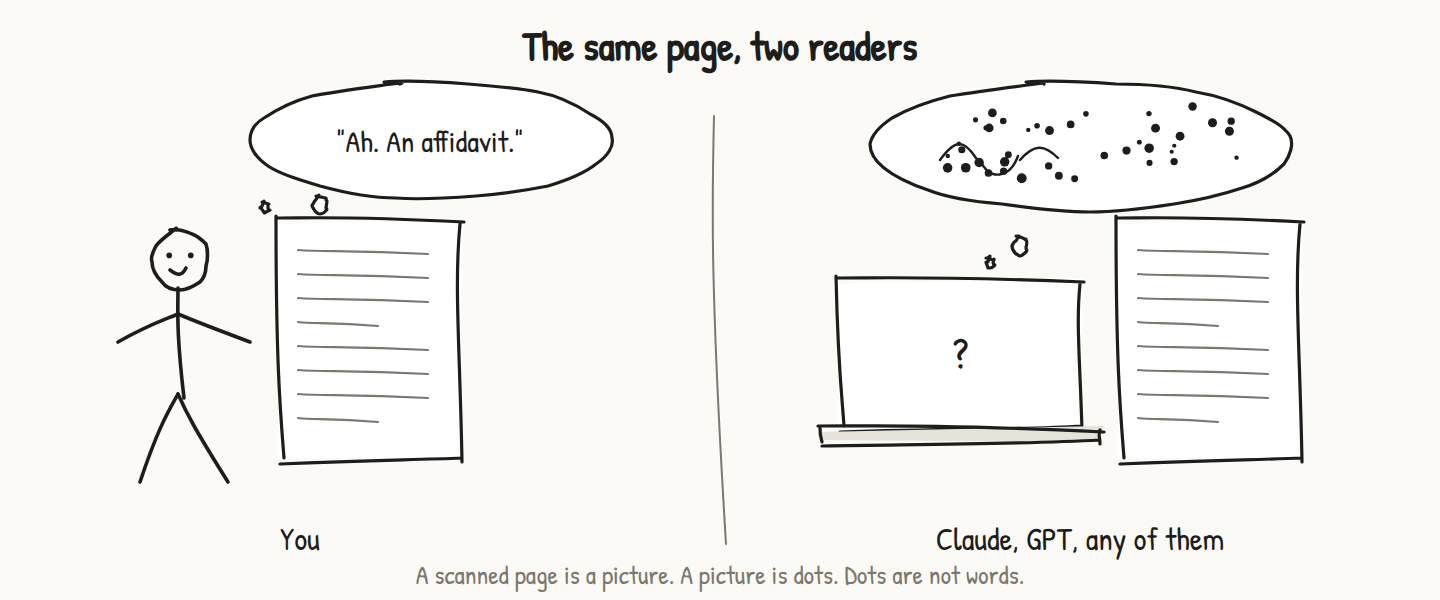
If a large language model could never read a PDF at all, that would at least be obvious and well known. But of course we know that Claude reads PDFs. How else could it produce such a buttery and clever-sounding analysis of the brief? And this is where the treachery sneaks in.
I am an advocate in private practice in Johannesburg. I receive an instruction to provide a legal opinion, advice on strategy, or to defend a client in court. The instructions come in the form of papers, emails, and of course PDFs. Hundreds of PDFs. Some huge PDFs. Of varying quality and often bearing court stamps, watermarks, handwritten notes, signatures and other litter. Scanned from files, downloaded from the court’s online filing system, photocopies of photocopies, scanned long ago and included as a signed annexure to an affidavit. Bad printouts of large spreadsheets, with teeny fonts and too many cells on a single printed and scanned page. Photos. You get the point.
Pre-Cowork this was not a big deal. I generally worked off hard copies, so that I could use my beloved flags and highlighters, and of course make handwritten notes on the lawyer’s favourite thing, the yellow legal pad. (By the way, I figured out after about 20 years’ practice what makes yellow legal pads indispensable to lawyers, aside from looking cool. It’s the reflectiveness. Or rather the lack of it, compared to a glaring sheet of white notepaper.) And Adobe Pro can bring any PDF to life on the screen and printer, even though sometimes pages remain upside down. So no problem.
Then 2026 arrives. I finally wake up to the AI thing, and by chance I discover Zack Shapiro’s post on X about using Claude Cowork in a small legal practice. Mind blown. Read it and his other epic posts immediately if you haven’t yet.
Zack Shapiro (@zackbshapiro) is managing partner of Rains LLP in New York. The pieces I keep going back to, all published on X in 2026: The Claude-Native Law Firm, The Judgment Premium, The 10x Lawyer and The Input Layer. He is a corporate lawyer working in a different system from ours; the working method carries over, the ethics rules do not.
So now I get into Cowork in a big way. I’m dumping PDF files in by the truckload, and producing memos, opinions and pleadings on the fly. As if by magic. Of course I check the product before it goes out, but my new bestie Claude is so clever that I am lulled into a sense of security. This magic AI machine knows what it’s doing. Knowledge work is forever transformed. And I can turn work around far quicker than before.

Three near misses
The first wake-up call. A summary of the key findings in a forensic report that I fed into Cowork misses the most crucial finding. This I discover by chance when I finally get round to reading the full forensic report. Turns out a strategically placed watermark and some extra toner noise meant that those paragraphs were not legible to Claude. Perfectly clear to the human eye, but not to the AI.
Second near disaster. Claude, reading a standard referral form for a labour dispute, completed by hand, misses a second applicant, scrawled in the margin of the form. Which means that all the analysis and the ultimate memorandum I produce never mentions the additional party. Really embarrassing, but it was picked up early and caused no harm. Lawyers will know how easily a small mistake like that could lead to real disaster: default judgment, prescribed claims, disciplinary proceedings, the stuff of 3am nightmares.

Third near miss. A bunch of scanned judgments in PDF format need summarising. Claude does a brilliant job. Except when, for reasons that are still not clear to me, it struggles to read a judgment. And proceeds to MAKE THINGS UP. A totally plausible-sounding summary in the required format, with key findings that look fine at first glance, is produced. But it’s a total fabrication. Facts, legal findings, the works. So easy to glance at the product and add it to the submission. And then when it is exposed, there is no hiding from it: full-blown disaster, disgrace, the works. Legal Twitter is replete with these horror stories.
The lesson I learnt is that AI is not a magic box that turns PDFs into gold. It is a brilliant but sometimes totally unreliable alien intelligence that will change your working life, but that can also potentially ruin your professional reputation. But once I had experienced the thrill of AI reading hundreds of pages of trial transcript and producing gold-standard summaries and analysis, there was no going back. So how to balance the opportunity and the risk?
Verify. Again. Then again. Then some more.
OCR: part friend, part foe
The by now bored reader of this note will have asked themselves why this idiot didn’t just OCR the hell out of all things PDF. Problem solved: the computer reads the PDF using optical character recognition, converts it into computer-readable text, and off we go.
Except that OCR is another dagger waiting to bury itself in your unsuspecting back when you have finally regained full confidence in your magic AI helper. It works, often very well and quite reliably, until it doesn’t. And it doesn’t tell you what it can and cannot read. So you end up with a bundle of documents that is no longer 50% legible to AI. It is now 90% legible. But you don’t know that 10% is illegible. You also don’t know which 10% is illegible. Sometimes it’s 100% legible after OCR. Sometimes much less. But you don’t know, because there are no warning flags. And so you merrily cram folders full of scanned contracts, judgments, whatever into your project. Claude chomps through them like a champion and produces outstanding work product that needs only a minor touch to get it just right, and off it goes. But lurking in there is some illegible monster that will come to bite you. Maybe not in this matter. But sometime. And it could be trivial. It could be fatal. If you are a halfway decent and conscientious lawyer, this poses a problem.

OCR is a very old technology. What follows is my basic and probably flawed understanding.
Basically a scanned PDF is total gibberish to a computer. It is a series of dots, lines and squiggles sitting at defined longitude and latitude on a page. That’s it. That’s why Adobe doesn’t automatically right pages that are sideways or upside down. It doesn’t know they are upside down! OCR is a technology that scans for known patterns of squiggles and squidges, and when a shape emerges that matches a letter of the alphabet, it records it as, say, a “C”. And so on. Then words and sentences emerge, and then sometimes the page will be turned the right way up.

OCR is really powerful and really helps make PDFs legible. You can use Adobe Pro to OCR large PDF files in bulk, and it flies through them. You can ask Claude to find and use OCR tools on a scan, and it willingly obliges. ChatGPT has a PDF plugin built in that works well too. So what then is the problem? We need accuracy and reliability. And we need to know if any documents, or portions of documents, are illegible, or have been incorrectly read, or where uncertainty exists. My experience has been that simply running PDFs through OCR on Claude or ChatGPT will eat a bunch of tokens and produce a mixed bag of results. Sometimes great, sometimes awful, and never clear which side of the great/awful divide you land on.
Subscription services such as LlamaIndex do very high quality PDF reading, and can convert the output into markdown files. Llama will make sure your PDFs are properly ingested and fully AI-ready, but I find it way too expensive to justify as standard practice. It’s great for a really difficult PDF, such as an annual report with graphs and text that need to stay together and be understood together. Worth a try in your practice.
Don’t trust. Verify.
For high-risk work, I want absolute assurance that the output is accurate. Written argument to court is about as high-risk as it gets in my little corner of the world. Not exactly patient-dying-on-the-table drama, but enough to do serious damage to a professional reputation. And, in a small way, potentially damaging to the rule of law.
An acting judge in Johannesburg recently demonstrated what can go wrong. The judgment under appeal cited, among other errors, a case that does not exist. The full bench put the bad authorities aside and referred the matter to the Legal Practice Council. I have written about it separately: Names of non-existent cases are not law. Hopefully the law reports don’t cite the fake judgment by its (fake) name, because that will in itself risk polluting the law.
In less dramatic circumstances, a senior trial lawyer at the top of his game was surprised to find that one of the cases cited in written argument prepared by junior counsel did not exist. He bore the brunt of the court’s criticism, and the judgment was reported far and wide. It even made it onto the global database of cock-ups of this nature, lovingly maintained by the French lawyer Damien Charlotin, and worth checking out.
The second example is perhaps more forgivable, as it happened in the early days of ChatGPT, when hallucinations by LLMs were frequent but not widely known to lawyers. And the hallucinations can be incredibly subtle, such that a trained eye would simply see a plausible-sounding case name, cited in support of a well-known and trite principle of law. Before LLMs, fabricating an entire case citation would have required a conscious act of deception, something a conscientious lawyer would never dream of doing. Enter ChatGPT and the early LLMs, and suddenly you have a magic writing machine that sounds completely plausible.
I nearly struck disaster in 2025 using Gemini to help with written argument. I fed it the actual cases to cite, in an area of law I was deeply familiar with, and it produced some wonderful, completely plausible-sounding quotes that really captured the essence of the legal proposition. The quotes were spot on, and I recognised the cases relied upon, as I knew them well, and they were all downloaded on my computer. On the spur of the moment I decided to look up one of the quotes. I couldn’t seem to find it in the judgment. While the principles were to be found in the judgment, and even snippets of the same wording, the actual quote did not exist. So I checked the other quotes. And it turned out that Gemini had scrambled up the case names and quotes. Literally scrambled up the words, so that case names were slightly altered, and quotes were made up. They were brilliant quotes, and if simply paraphrased, would have been fine. But as soon as you quote from a judgment, or an affidavit, or a letter, or a contract, or anything, the words had better appear in that source, in that sequence. And LLMs love a catchy quote.
So when I started using Claude Cowork seriously in 2026, and having survived a few near misses, I became obsessed with verification tools. How can I know that Claude knows what’s going on? That it isn’t making up probable-sounding and plausible quotes or arguments? That it can read (and has actually read) all relevant documents before summarising the matter? That the judgment cited actually exists (easy to check), that the quoted words appear in the judgment (fairly easy to check), that the judgment itself, and the context in which the quoted words appear, actually support the proposition advanced? This last one is not that straightforward.
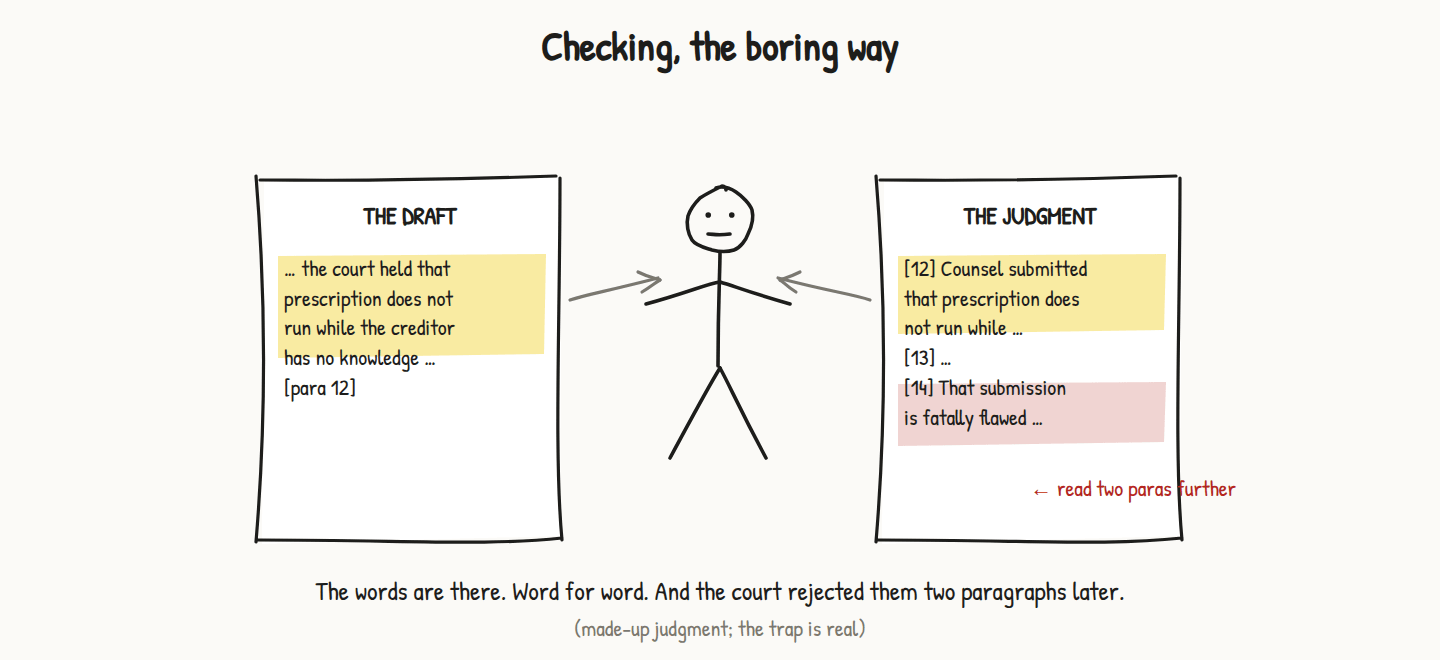
An example, with the case left unnamed. In a draft argument produced by Claude, the phrase in a judgment “prescription does not commence in circumstances where the creditor had no factual knowledge of the debt” sounds about right, is spot on for the argument I’m working on, and appears verbatim in the case cited. So far, so good. And all my clever Claude verification skills are happy. But reading the judgment carefully shows the problem. The quotation is actually a recordal of a submission made by counsel, and the court goes on to state, two paragraphs later, that the proposition is not an accurate statement of the law, because “counsel’s submission is fatally flawed because the principle of lack of knowledge of the debt staying prescription is not absolute, and does not apply if the creditor could have reasonably acquired knowledge of the debt at an earlier stage.” Claude missed this context, and if I didn’t check, so would I.
So what does “checking” mean in practice? Isn’t AI supposed to save us from all the tedious tasks of careful reading and analysis of all the sources and cases, and the painful task of crafting written argument that is hopefully persuasive, but which must above all be true to the law and the evidence? I must confess that after about eight months of daily use of AI in my legal practice, I have not managed to unlock major time savings. I have slowly and with much effort managed to improve the quality of my research and legal writing, and to become more efficient in getting work done. And, occasionally, to do something I would not have been able to do without AI. But the days of clicking a button and marvelling at the fake magic produced are long gone. What remains is painstaking and sometimes pretty boring honing of the skills of using AI well in my practice. Some of which I hope might be informative and potentially useful to the reader.
What I actually do now
In September 2026, my workflow for a paper-based matter is more or less as follows.
Create a new folder for each new matter. Ingest all materials received (PDFs, brief letter, emails, downloads from links, and so on) into a “hopper” folder. I picture the bean hopper on top of an espresso machine. Everything goes in there to start.
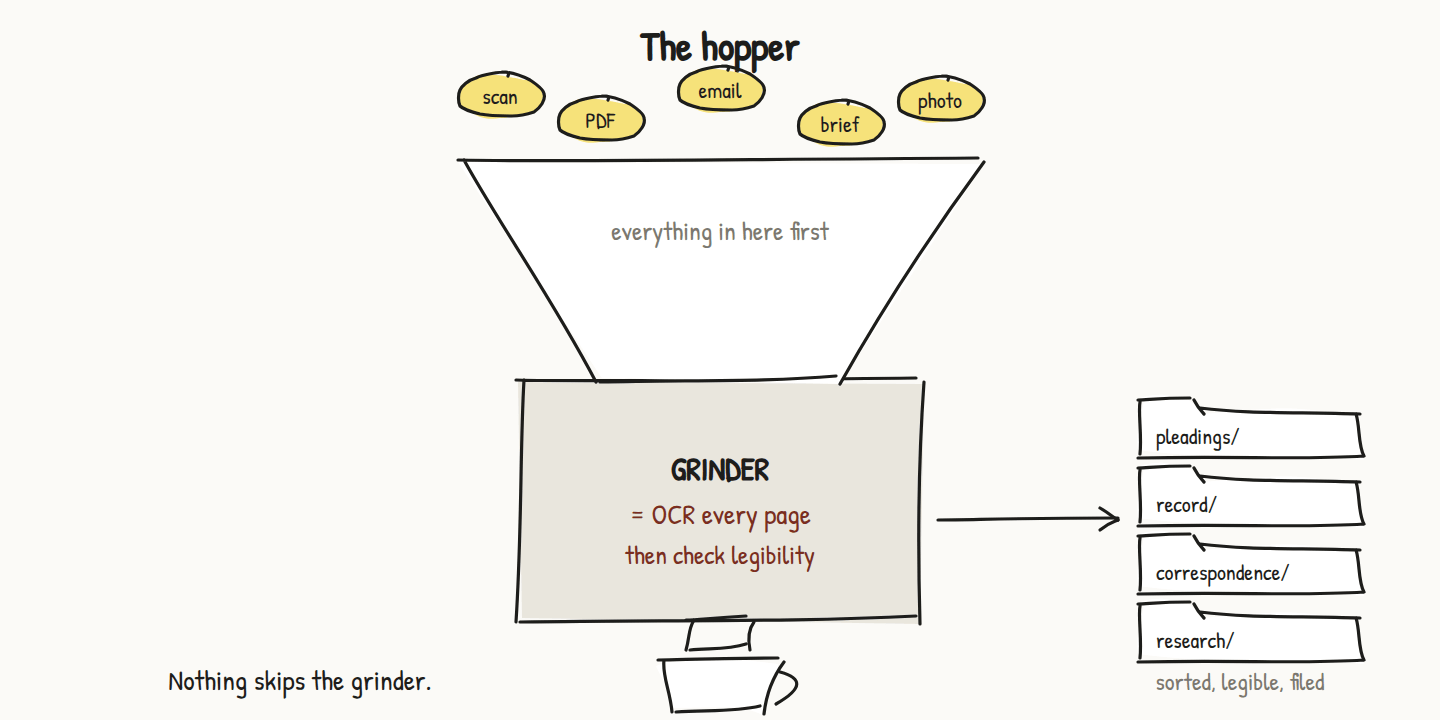
Then the grinding begins. OCR the living daylights out of every PDF. I use Adobe Pro. I am working on a local OCR app in ChatGPT that runs on my own machine and doesn’t use any tokens. The aim is to see if I can ever get out of my expensive Adobe subscription. So far, not so good. But it’s a fun little tool and so easy to iterate improvements, simply by pointing and complaining, in the Festivus tradition. “This button is weird. Move it and make it do something different” (to what I originally asked). But OCR, for all its faults, is a critical first step in the ingestion process.
How the grinding works, page by page, with pictures and a prompt you can copy: PDF intake. What happens to the words Claude still cannot read: the legibility check.
Files are ground through OCR and then filed into sensible subfolders. Claude and ChatGPT do this (they share skills). Then it’s time to map and index the material. More on this in a later post.
Then research. Some done by Claude, in approved resources only. Mostly done by me in my online subscription and open-source legal resources. Everything downloaded in PDF, and saved to the project’s research folder. Nothing cited anywhere unless it’s physically in the folder.
I’ll skip a few steps: writing an outline, producing a first draft, producing the tenth draft, applying my writing style, producing chronologies, witness summaries, legal argument notes, and so on. Claude is very good at output. Too good, in fact. Soon the project folder is a total mess.
Final draft, ready to go (almost). Now for proper checking, the kind that will hopefully save my reputation from the dreaded question from the bench: “Where do I find that quotation in the actual judgment?”

The final draft of the written argument is 30 pages. It is beautifully formatted and properly indexed. It contains detailed footnotes referring to dozens of places in the appeal record, and many judgments, all lovingly cited, quoted and referenced down to paragraph and page number. Every one of those footnotes is a place where I can be embarrassed. So every one of them gets checked: does the judgment exist in my research folder; do the quoted words appear in it, in that order; does the paragraph number match; and, the slow one, does the judgment, read around the quote, actually say what I am using it for. I have built Claude skills that do the first three mechanically and show me the results. The fourth one is me, with the judgment open.
The check itself, with a sample check sheet and a prompt you can copy: the citation check.
None of this is clever. It is the same checking a careful junior would have done in 1998 with the law reports open on the desk. The difference is that in 1998 the junior could not produce thirty pages of plausible, well-formatted, wrong footnotes in four minutes. Now they can. So can I. Hence the checking.
Leave a comment